Service 04 / 06
Automation & AI
Assistants and workflows that handle the repetitive admin for you.
Sydney-based. Working Australia-wide.
Illustration: an assistant sketches itself, then prepares a morning briefing from the inbox, forms and reports. It drafts a reply that waits for approval, and once approved it is sent and logged.
Try itRun the routine, then make the call.
The reply to Jess was approved and logged.
Automation & AI
What you get
Most small businesses lose hours every week to the same admin: copying details between systems, chasing follow-ups, building the same report. As an AI automation consultant in Sydney, I set up the workflows and AI assistants that take that work off your plate.
I build connected workflows that run on their own, and AI assistants (including Grok Bot setup and training) that research, draft and report for you. You might have searched for an AI automation agency. This is the same work without the agency layers: you talk to the person building it.
- Connected workflows
- AI assistants (including Grok Bot setup)
- Automated reports
- Enquiry follow-ups
- Training and handover
How it fits together
The assistant loop
This is the pattern I use for AI work. The assistant does the legwork and drafts. You make the call. Only then does anything go out.
- 01
Inbox
Emails and enquiries that need a reply.
- 02
Forms
Orders, bookings and quote requests.
- 03
Reports
Numbers you review on a schedule.
- 04
Assistant drafts
Reads, researches and writes the first version, using your business context.
- 05
You approve
Nothing important goes out without a yes from you.
- 06
Sent and logged
Approved items go out and every action is recorded.
§ 01
What’s worth automating
Not everything should be automated. The best candidates share three traits: they happen often, they follow the same steps each time, and a mistake is easy to spot.
- Copying enquiry details into a CRM or spreadsheet
- Sending confirmations, reminders and follow-ups
- Pulling the same numbers into a weekly report
- Updating stock, prices or product data across systems
- Sorting and routing incoming emails or forms
I start by watching how the work happens today. Sometimes the answer is a small workflow. Sometimes it’s “don’t automate this yet”, and I’ll say so.
§ 02
Connected workflows
A workflow connects the tools you already use, so that something happening in one triggers something in another. A form is submitted, the enquiry is saved, you get an alert, the customer gets a confirmation and a follow-up is scheduled.
Business automation only helps if you can trust it. I use the simplest tool that does the job reliably, and every workflow has error handling and alerts, so you hear about a failure straight away instead of finding out weeks later.
§ 03
AI assistants for your business
An AI assistant can read, research, summarise and draft. Set up well, it works like a capable team member who has read your processes. Set up badly, it’s a chatbot that makes things up.
Grok Bot setup and training is a named offer. I configure the assistant around how your business runs, teach it your routines and train you and your team to use it. If you’ve already chosen Grok Bot, I’ll set it up. If you haven’t, I’ll tell you honestly whether it, or another assistant, fits the job.
What a setup covers
Workflow discovery
We map the work you want off your plate: what triggers it, what it needs, who checks it and what “done” looks like.
Configuration
I connect the accounts it needs, give it the business context to work from and set approval rules, so anything important waits for your yes.
Skills and routines
I turn your repeatable processes into reusable skills, and schedule the recurring ones so they run on their own.
Testing and handover
I test it on real examples from your business, fix what’s off, then show you and your team how to use it and where its limits are.
Ongoing support
Questions, adjustments and new routines as your needs change, if you’d like me around.
What it can do for you
Daily business briefing
What came in, what’s due today and what needs a decision.
Weekly reporting
The Monday report, drafted before you sit down.
Customer account reviews
A summary of each key customer’s recent orders, conversations and open issues.
Research
Competitors, suppliers or regulations, summarised with sources you can check.
Follow-up drafts
Replies and follow-ups written in your voice, waiting for your approval.
§ 04
How a setup runs
Short call
You tell me where the time goes. I tell you what I’d automate and what I’d leave alone.
Fixed quote
A written scope of what’s included, so the price is known before work starts.
Setup and testing
I build it in your accounts and test it on your real examples. You see it working before it goes live.
Handover
A walkthrough, written notes and a way to reach me when something needs changing.
§ 05
What AI shouldn’t do unsupervised
AI is useful, and it’s also sometimes wrong while sounding certain. So I set every assistant up with limits. By default, these stay with a person:
- Sending messages to customers without your approval
- Moving money, issuing refunds or changing prices
- Making hiring, legal, medical or financial decisions
- Deleting or overwriting records
- Publishing anything under your name
The pattern is simple: the assistant drafts, you approve, then it’s sent and logged. Once you trust a routine, you can loosen the approval step for that one routine and keep it tight everywhere else.
Problem, then fix
Sounds familiar?
The problem
Monday morning disappears into the same report.
What I’d do
A weekly report drafted for you, ready to check and send.
The problem
Follow-ups slip when the week gets busy.
What I’d do
Drafts waiting for your approval, so a reply starts from something, not a blank page.
The problem
You tried an AI tool and got generic, unreliable answers.
What I’d do
An assistant given your business context, with approval rules, tested on your own examples.
Proof
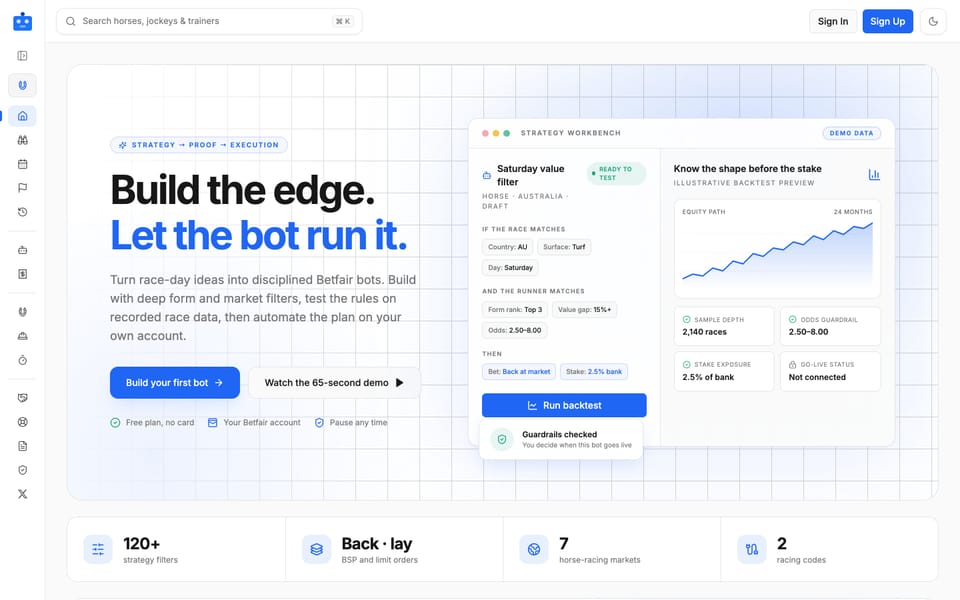
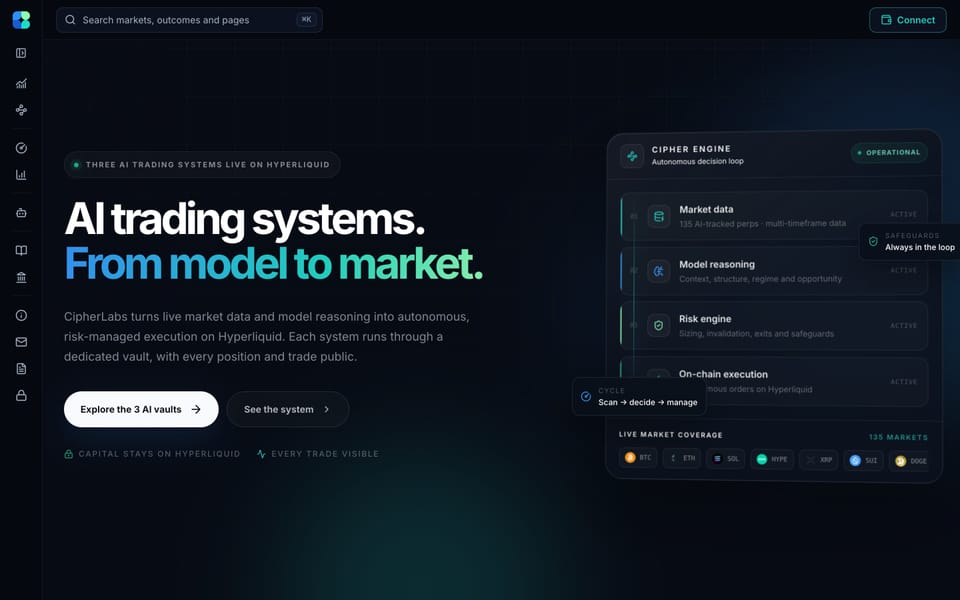
Automation I run every day
These are real systems, built and run by me, that collect data, make decisions and act on schedule.
FAQ
Questions about automation and AI
Something else on your mind? Email me at kagan@kaganpowell.com.au
What’s an AI assistant setup?
I configure an assistant, such as Grok Bot, around your business: connecting the tools it needs, building routines like a daily briefing or weekly report, testing it on real examples and showing your team how to use it.
What is Grok Bot setup and training?
It’s a named offer. I set up a Grok Bot assistant around your business, build the skills and routines it needs, test it, and train you and your team. Ongoing support is optional.
Is it safe to give an AI assistant access to my accounts?
It depends on what access and how it’s set up. I connect only what a routine needs, put approval rules on anything that goes out or changes data, and keep the accounts in your name so you can switch access off at any time. I explain where your data goes before we connect each tool.
Do I need to be technical?
No. I handle the setup, and the training shows you and your team how to use the assistant in plain English.
How much does automation cost?
It depends on the size of the job, so I give a fixed quote after a short call. Many workflows are small. Any tool subscriptions are paid directly by you and explained upfront.
How is this different from an AI automation agency?
You work with me directly. I lead the strategy and do the building, so there’s no account manager passing messages along. Everything is set up in your accounts, and you own it.
Get in touch
Tell me what’s eating your week.
Describe the admin you’d love to hand off. I’ll reply within one business day with what I’d automate and what I’d leave alone.
or email kagan@kaganpowell.com.au